Plan your day & use the phone map
The demo allows one after-work activity per day. Browse and check messages before choosing an outing; calling it a day moves you to the night-at-home phase.
Plan around the three phases
Lunne's day is split into daytime bakery work, evening exploration, and night at home. The decision that most often catches new players is ending the evening before using the activity they wanted. In the demo, choosing to call it a day advances you to the home-at-night part of the routine.
The after-work tutorial also makes a specific distinction: you can browse shops, but activities take time and only one is available per day. A cinema visit is therefore a commitment to that day's outing, not another stop you can freely stack with every restaurant visit.
| Phase | Main task | Useful check before moving on |
|---|---|---|
| Daytime | Supply the bakery and serve customers | Finish the current order or story dialogue |
| Evening | Explore, browse, talk, choose an outing | Read messages and choose your one activity |
| Night | Rest, use available home options, practice recipes | Finish what you intended to do before sleeping |
This is the demo's broad rhythm. It is not a minute-by-minute formal-release timetable.
Browse before committing to an outing
Use the first part of the evening to decide what matters to you today. You may want a new recipe book, a decoration, a conversation, or an outing with a friend. Compare shop options before choosing the activity, especially when money is limited.
The cinema and restaurant in the recorded introduction show different outings. An invitation lets a character accompany Lunne where the option is available. Pick the person and activity that interest you; there is no verified table here assigning every outing a fixed friendship gain or a guaranteed romantic outcome.
A practical order is check phone → browse needed shops → talk to the relevant character → choose activity → return home. That order is a recommendation for keeping decisions visible. It does not imply that every conversation is mandatory or that all shops have identical hours.
If an activity becomes unavailable after another outing, check whether you have already used the day's activity before treating the option as a quest bug.
Use the phone map to choose a destination
The official map screen presents the selected district's description, activities, and quest note beside the city map. This is more useful than walking to the edge of every street when you are trying to remember which location has the next story step.
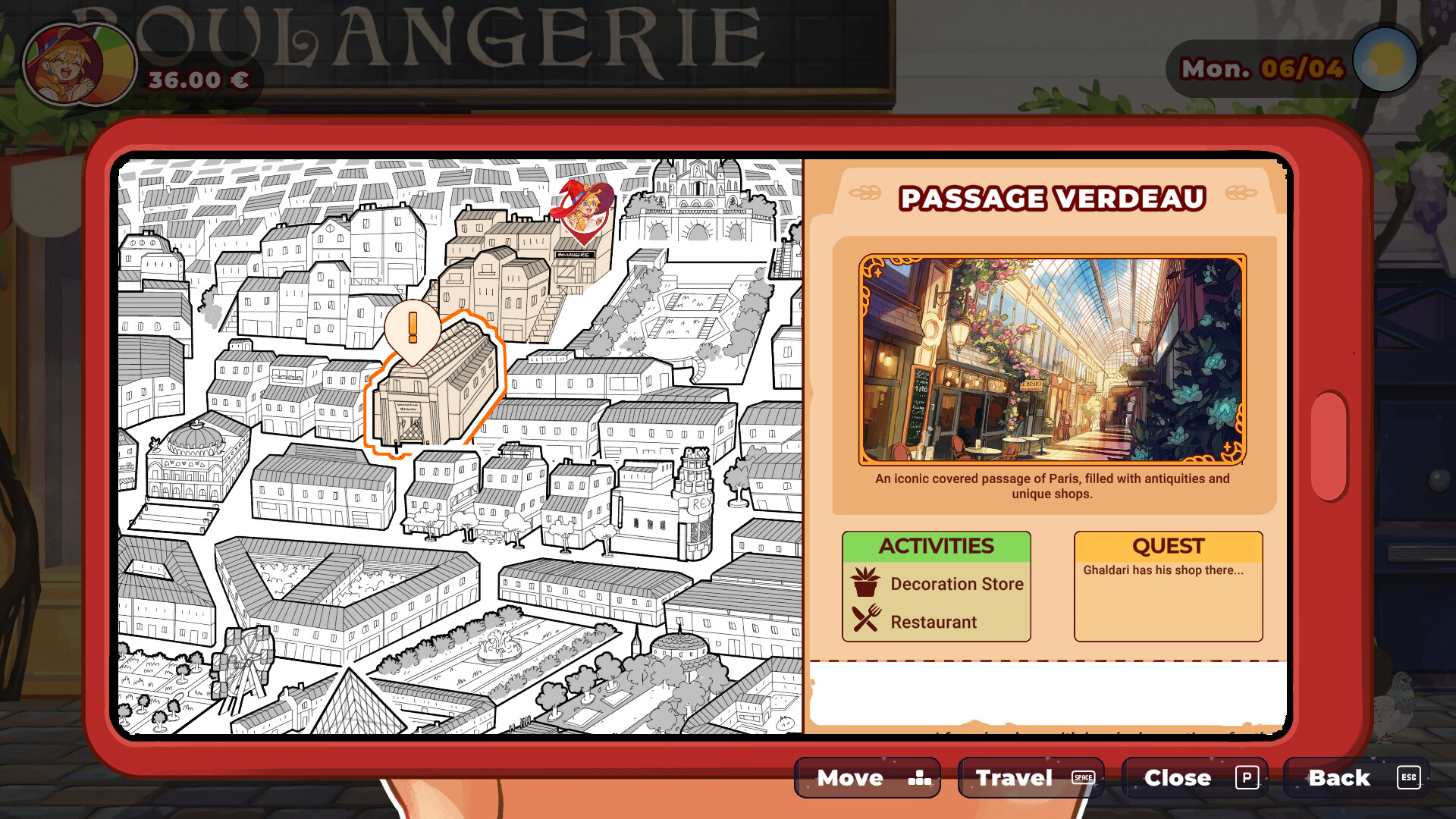
For Passage Verdeau, the illustrated screen lists a decoration store and restaurant, alongside a note about Ghaldari's shop. Select the destination and use the travel prompt. On the shown PC layout, Space is travel, P closes the phone, and Esc goes back.
Treat those as the keyboard bindings displayed in that official screenshot. Controller prompts and rebinding take priority in your own game. If you cannot find the phone entry point, check the controls menu rather than clicking every part of the money display; a demo player specifically reported overlooking the map because they expected a mouse button.
The map is also a way to separate activities from destinations. A district may contain several places, but arriving there does not grant several daily activity slots. Read the selected activity and the game's prompt before confirming it.
Check messages after story encounters
The phone matters for more than travel. After the early Estelle encounter, the demo shows Lunne leaving a voicemail about accounting help. Estelle's later reply gives the next meeting time. A quiet street or a closed destination can therefore mean you are waiting for an appointment, rather than missing a movement command.
Read the message's day and time before repeatedly revisiting the location. Keep serving the bakery and following the available routine while waiting. The recorded demo ends before the planned continuation, so that appointment should not be treated as an accessible post-demo objective.
The current full-game FAQ introduces Estelle in Chapter 2. Our first-days route explains the earlier demo encounter separately, including the Heart Palace barrier that leads to the phone conversation.
Energy and ending the evening
The tutorial says work and most activities need energy, and that sleeping or relaxing activities restore it. It does not supply a complete numerical cost table in the material used for this guide.
Watch the energy information in your game and listen to Orio's late-night reminders. Do not assume a particular walking-speed penalty, opening delay, or financial punishment exists just because a player suggested one in the feedback thread. Suggestions for future design are not confirmed mechanics.
Before choosing to call it a day, check whether you still want an outside activity. Once you are home at night, choose among the options actually offered there. Night-time atelier practice is a different part of the routine from the daytime dough workstation; see the bakery guide if you are mixing those two up.
In the recorded demo, Sunday is a day off and the unlocked park offers a relaxing outing. That is an introductory example, not a claim that every later week or formal-release chapter has the same unlocked places.
A short evening checklist
- Read new phone messages and appointment details.
- Check the map's quest note for the destination you selected.
- Browse what you need before spending the activity slot.
- Confirm whom you want to invite when an invitation is available.
- Return home when ready, choose the available night option, then sleep.
The activity limit and energy instructions appear at 40:39 in the recorded demo. The publisher's game page confirms the three day phases. The demo feedback thread documents the early-day-ending and phone-menu confusion this route addresses.